Understanding Objects in JavaScript
Explore with me the basic but essential information about Object

Intro
Some times we need to store related information together. For example we represent a person, we might need his Name, Age, Address. When we use single variable for each, It will be Massy quickly.
let name = "Rahul";
let age = 26;
let address = "Garia, Kolkata"
// so on
Here Object become very helpful in JavaScript.
Objects allow us to store multiple related values inside a single structure using key–value pairs.
What Objects Are and Why They Are Needed
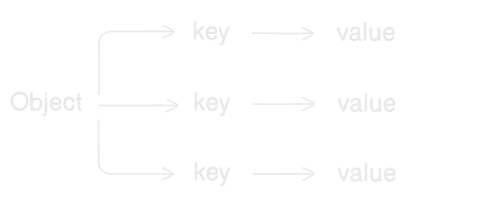
In simple word Object is a collection of key-value pairs.
key is the name of the property.
value is those data that we wants store in
Example
let person = {
  name: "Rahul",
  age: 25,
  city: "Kolkata"
};
Here
name is a key and the value is Rahul
age is a key and the value is 25
and also, city is the key and the value is Kolkata
So, the object of a person is the all related information stored in a single structure, very clean and organized.
Creating Objects
There is a multiple ways to create an Object, But the most common way is object literal syntax.
That is pointed the value of a variable, enclosed with a curly braces.
Example
let person = {
  name: "Rahul",
  age: 25,
  city: "Kolkata"
};
Rules:
Objects use curly braces
{}Properties are separated by commas
Each property has a key and value
Accessing Properties
We can access any objects property with two way
Dot Notation
This is the most common and simplest method.
let person = {
  name: "Rahul",
  age: 25,
  city: "Kolkata"
};

console.log(person.name) // Rahul
console.log(person.age) // 25
Here we access the property using:
object.property
Bracket Notation
We can also use square bracket to access the objects property, basically this method used when the properties are need to access dynamically.
Example
let person = {
  name: "Rahul",
  age: 25,
  city: "Kolkata"
};

console.log(person["name"]) // Rahul
Here we must use the property as a string
Updating Object Properties
Here everything is ok, until we need to change the value of any object property. What about if we need change them?
Don't worry, JavaScript give the that flexibility. Suppose i have assign the age with wrong information, then we can change the data as mentioned bellow
Example
  let person = {
  name: "Rahul",
  age: 25,
  city: "Kolkata"
};

person.age=26

console.log(person.age) // 26
That's easy, JavaScript simply replaces the old value with the new one. Now the output of the age will be 26
Adding New Properties
In such similar ways we can create any un-declared property.
Example
  let person = {
  name: "Rahul",
  age: 25,
};

person.city="Kolkata"

console.log(person) // { name: 'Rahul', age: 25, city: 'Kolkata' }
Deleting Properties
JavaScript give us a default keyword delete by using it we can delete any object's property.
Example
  let person = {
  name: "Rahul",
  age: 25,
  city: "Kolkata"
};

delete person.city

console.log(person) // { name: 'Rahul', age: 25 }
Looping Through Object Keys
Objects are often used with loops to access all properties.
One common way is using for...in loop.
Example
let person = {
    name: "Rahul",
    age: 25,
    city: "Kolkata"
};

for (let key in person) {
    console.log(key + ` = ` + person[key]);
}
Output ->
name = Rahul
age = 25
city = Kolkata
keyrepresents the property nameperson[key]gives the value
Array vs Object
Arrays store values using index numbers.
let fruits = ["Apple", "Banana", "Orange"];

console.log(fruits[0]); // Apple
0 -> Apple
1 -> Banana
2 -> Orange
But Objects store the value using named keys as a key-values pair
let person = {
  name: "Rahul",
  age: 25
};

console.log(person.name); // Rahul
Array is ordered list, Object is named properties.
Array is access with index numbers (0 - less than own length), Object access with key name.
Array Simple can be a list of items, we can use Object as a information storage.
Let's play with Object
- Create an object representing a student
let student = {
name: "Janardan",
age: 26,
course: "Cohort2025"
}
- Update one property
let student = {
name: "Janardan",
age: 26,
course: "Cohort2025"
}

student.course = "Cohort2026"
- Print all keys and values using a loop
let student = {
    name: "Janardan",
    age: 26,
    course: "Cohort2025"
}

student.course = "Cohort2026"

for (const key in student) {
    console.log(`\({key} : \){student[key]}`);
}
Output ->
name : Janardan
age : 26
course : Cohort2026
Thank you!
Love from me !


